Industry · 11 min read
Microsoft Teams 2026 Bot Ban: Complete Admin Guide
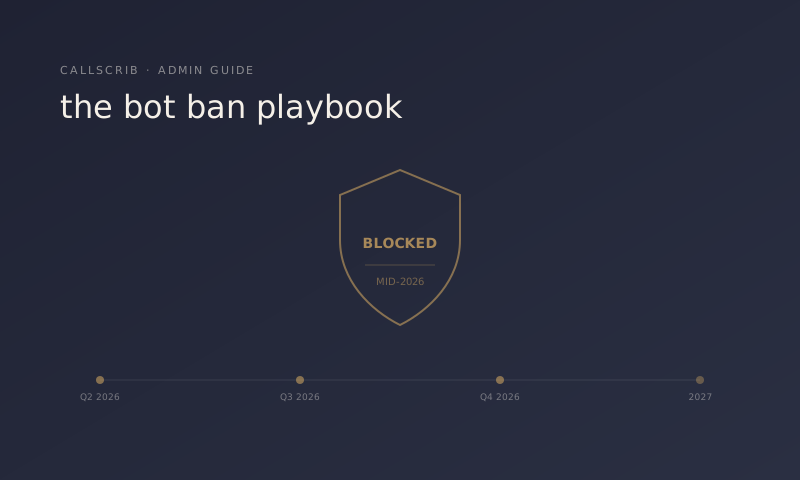
A practical reference for M365 administrators evaluating which meeting notetakers will keep working — and which won't — after Microsoft's third-party bot restrictions take effect. Starting in Q3 2026, Microsoft is tightening restrictions on third-party bot accounts joining Microsoft Teams meetings. Tools that send a bot user into meetings — including Otter, Fireflies, Fathom, Read.ai, and most third-party notetakers — will face new lobby warnings, admin block lists, and tenant-level enforcement options. Tools that read transcripts via the Microsoft Graph API instead of joining meetings as bots are not affected.
TL;DR for IT admins
If you're an M365 admin, three things to do this quarter:
1. Audit which notetakers are in active use in your tenant (Teams Admin Center → Manage apps).
2. Classify each by integration model — bot account vs. Graph API.
3. Plan migration timelines for bot-based tools before Q3 enforcement begins.
This guide walks through each step in detail and explains exactly what changes, when, and why. For a feature-level comparison of surviving options, see our best AI notetaker comparison for Teams.
The AI notetaker built for Microsoft Teams. No bot in your meetings. 7 meetings per month free, no credit card.
What's actually changing
Microsoft is rolling out three policy shifts that, together, restrict how third-party AI meeting notetakers can operate inside Teams.
Change 1: Suspected threat warnings in meeting lobbies. When a bot account joins a Teams meeting, participants will see a lobby warning that flags it as a "Suspected threat" if the bot is not on the tenant's allow list, has not completed Microsoft 365 Certification, lacks Publisher Attestation (the blue checkmark in Teams Admin Center), or is joining a meeting where the organizer has not explicitly approved third-party bots. The warning appears for all participants, not just the organizer — many will reject the bot or end the meeting.
Change 2: Tenant-level enforcement controls. M365 admins will gain new toggles in Teams Admin Center → Meetings → Meeting policies, including: block all third-party bots from joining meetings (tenant-wide); allow only certified bots from approved publishers; require organizer approval for any bot account; block bots from external organizations entirely. These controls already exist in preview for some tenants. The Q3 2026 rollout makes them generally available and, in some Microsoft customer segments, the default-deny option becomes the default setting — not opt-in.
Change 3: External meeting restrictions become stricter. Even if your own tenant allows a third-party notetaker, your customers' and prospects' tenants may not. When you bring a notetaker bot to an external meeting, the other organization's lobby warning fires for everyone, their host may have a one-click reject option, and some organizations will reject any non-employee bot automatically. For sales teams specifically, this means tools you can use internally may not work in customer-facing meetings.
Why Microsoft is doing this
Three reasons, in order of weight from Microsoft's published rationale:
1. Security and compliance. Bot accounts that join meetings can read everything said — transcripts, screen share content, chat messages, file attachments. Microsoft's enterprise customers in regulated industries (financial services, healthcare, defense, legal) have been requesting tighter controls over what external bots can access. The 2026 changes are a response to that demand.
2. Anti-abuse. Several incidents over 2024–2025 involved bot accounts impersonating real users, joining meetings without organizer awareness, or being used to record and exfiltrate proprietary information. Microsoft is treating bot accounts as a higher-risk vector than they previously were.
3. Platform strategy. Microsoft has its own AI meeting capabilities (Microsoft 365 Copilot, Intelligent Recap, Teams Premium meeting summaries). The 2026 restrictions tilt the playing field toward Microsoft's own tools and toward integrations that use Microsoft's sanctioned APIs (Graph API) rather than bot workarounds.
That last reason is worth being honest about — it's competitive, not just security-driven. But the practical effect for IT admins is the same: you need to know which tools are affected and plan accordingly. For background on why these policies were inevitable, see why bot notetakers keep getting banned.
Which notetakers are affected (and which aren't)
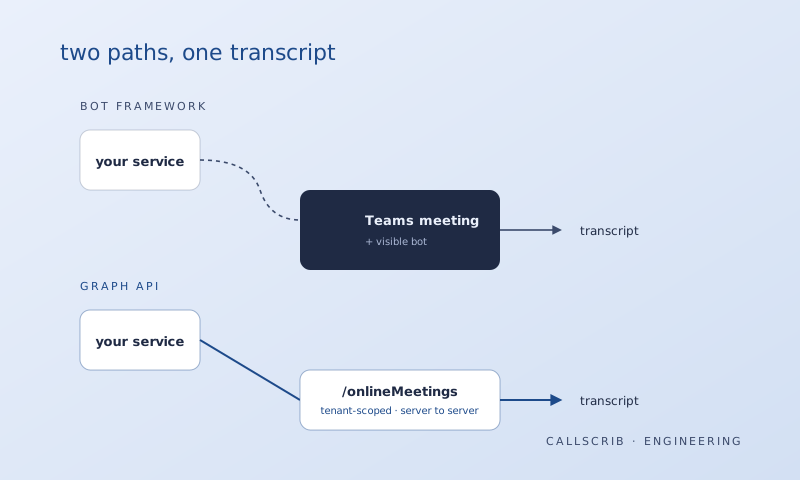
The defining question: does the tool send a bot account into the meeting, or does it read the transcript via Microsoft Graph API?
Tools that use bot accounts (affected by Q3 2026 changes). These add a virtual participant — usually with a name like "Otter.ai Assistant" or "Fireflies Notetaker" — that joins the meeting like any other attendee, captures the audio stream, and processes it externally:
- Otter.ai — joins as "Otter Notetaker" or via the Otter for Teams integration - Fireflies.ai — bot named "Fred" or similar - Fathom — bot account joins, especially in Teams meetings - Read.ai — bot participant - tl;dv — bot participant - Avoma — bot participant - Tactiq — bot participant in many configurations - Sembly AI — bot participant - Most consumer-grade AI notetakers built before late 2024
For these tools, the Q3 2026 changes mean lobby warnings, possible blocking, and reduced reliability in customer-facing meetings.
Tools that read transcripts via Microsoft Graph API (not affected). These never join the meeting. They run as a registered Microsoft 365 application, request specific Graph API permissions from the tenant admin, and read the transcript that Microsoft Teams generates natively:
- CallScrib — uses `OnlineMeetingTranscript.Read.Chat` (Resource Specific Consent) - Microsoft 365 Copilot — Microsoft's own product, native API access - Teams Premium Intelligent Recap — Microsoft's own product
If a tool is installed via AppSource, uses Resource Specific Consent (RSC) permissions, and the admin has explicitly enabled Teams meeting transcription tenant-wide, it's reading the transcript through Graph — not joining the meeting.
Tools where it depends on configuration. Some enterprise versions of Otter, Fathom, and Read.ai offer Graph API integrations for Microsoft 365 customers — but the consumer/SMB tier typically defaults to bot mode. Gong, Chorus, and Outreach Kaia often have multiple integration modes; check with your account team. If a tool offers both modes, switching to the Graph API mode (where available) eliminates the Q3 2026 risk. For more on the architectural difference, see our Graph API vs. bot frameworks comparison.
How to identify which mode your current notetaker uses
Three quick checks for any tool you have deployed:
Check 1: Look at your meeting participant list. Open a Teams meeting where the notetaker is active. Visible bot participant (named "Otter Notetaker," "Fireflies," etc.) → bot mode → affected. No visible bot participant, summary still appears → Graph API mode → not affected. This is the fastest test and almost never wrong.
Check 2: Check the app's documentation. Search for terms like "Graph API" or "Microsoft Graph," "Resource Specific Consent" or "RSC permissions," "Bot account" or "bot user," or "Join your meetings" — language that implies a bot joining. If the vendor's documentation describes a bot joining meetings, it's bot mode. If it describes reading transcripts from Microsoft's API, it's Graph API mode.
Check 3: Review the admin consent screen. Graph API notetakers request narrow, meeting-scoped permissions like `OnlineMeetingTranscript.Read.Chat`, `ChatMessage.Send.Chat`, and `OnlineMeeting.ReadBasic.Chat`. Bot-based tools typically request user-level permissions tied to a bot account, or use Teams app permissions for chat participation that don't include transcript reading. You can check current permissions in Microsoft 365 Admin Center → Enterprise applications → app name → Permissions.
Graph API native, no bot, summaries posted to Teams chat in 60 seconds. From $5 per user per month.
Start free trialMigration planning for affected tools
If you have a bot-based notetaker in active use, you have three paths forward. Pick based on how much migration effort you can absorb and what the tool's role is in your organization.
Path 1: Wait and see (risky, but defensible for low-usage tools). If your team uses the affected notetaker lightly — a handful of meetings per week, no critical workflows — you can monitor the rollout and migrate reactively. Cost is friction when SmartScreen warnings start appearing and meetings get disrupted. Not recommended for tools tied to revenue workflows (sales calls, customer success, executive meetings).
Path 2: Switch to the same vendor's Graph API mode (if available). Several major vendors are scrambling to launch Graph API integrations specifically to dodge the Q3 changes. If your existing vendor offers this mode and you're satisfied with the product otherwise, this is the lowest-effort migration: no retraining users, no workflow changes, same UI and notifications, existing data preserved. The catch: not every vendor has Graph API mode ready, and some Graph API modes have feature gaps vs. bot mode (e.g., real-time transcription during the meeting may not be available because Microsoft only generates transcripts after the meeting ends).
Path 3: Migrate to a Graph API-native notetaker. For organizations where the current notetaker is critical and the vendor doesn't have a Graph API option (or the option has feature gaps), the cleanest migration is to a tool that was built Graph API-native from the start. These tools tend to be newer than the major bot-based notetakers, specifically built for Microsoft 365 environments, limited to Teams meetings and Teams Phone by design, and often cheaper because they don't maintain bot infrastructure. The Microsoft AppSource directory is the place to find them, filtered by apps with the "Microsoft 365 Certified" or "Publisher Attested" badges.
Recommended actions for IT admins this quarter
If you administer a Microsoft 365 tenant, three things to do between now and Q3 2026:
1. Inventory third-party notetakers in active use. Where to look: Microsoft Teams Admin Center → Manage apps. Filter to "Custom apps" and "Third-party apps." Document which notetakers have been installed and roughly how many users have them active. What to capture: app name, vendor, install date, permission scope, approximate user count.
2. Classify each by integration mode. For each notetaker in your inventory, run the three checks described above to classify as bot mode or Graph API mode. Record this in your tenant's app governance documentation, or a simple spreadsheet your IT team maintains.
3. Decide on a migration plan for any bot-mode tools. High usage / critical workflows → plan migration before Q3 (Path 2 or Path 3 from above). Low usage / experimental → monitor and migrate reactively if friction increases. Already deprecated or being phased out → accelerate deprecation.
The earlier you start the migration conversation with the affected business units, the smoother the transition. Sales teams in particular tend to be attached to their notetakers, and giving them runway to evaluate alternatives helps adoption.
How CallScrib is built for this transition
Brief disclosure since this is the CallScrib blog: CallScrib was built Graph API-native from the start. We never had a bot mode. The Q3 2026 changes don't affect us, and we believe they push the market toward better-architected tools — including ours but also others.
If you're evaluating CallScrib specifically for a Graph API migration, the relevant facts:
- Architecture: Microsoft Graph API (`OnlineMeetingTranscript.Read.Chat` via Resource Specific Consent) - Setup: One-time install by M365 admin via AppSource; no per-user configuration - Coverage: Teams meetings and Teams Phone calls - Pricing: Free tier (7 meetings/month), Pro at $5/user/month, Business at $10/user/month, Enterprise from $14/user/month with 25-seat minimum - Microsoft 365 Certification: Publisher Attestation in progress; full Certification planned for late 2026
If you're not evaluating CallScrib, we'd still encourage you to plan the migration. The bot-ban changes are real, and the friction for affected tools will show up in user complaints before the rollout completes. Better to be ahead of it than behind.
Frequently Asked Questions
When exactly does the bot ban take effect?
Microsoft has communicated Q3 2026 as the general availability window, with some tenant-level controls already in preview. The exact date varies by region and customer segment — enterprise customers with E5 licenses see preview features earlier than SMB tenants. Watch the Microsoft 365 Roadmap and the Teams Admin Center "What's new" feed for specific dates affecting your tenant.
Does this affect Microsoft 365 Copilot or Teams Premium Intelligent Recap?
No. Both are Microsoft's own products, integrated natively. Neither uses a bot account. The Q3 2026 changes affect third-party bots only.
Will existing meetings be retroactively flagged?
No. The changes apply to new bots joining meetings after the rollout date. Historical meetings, transcripts, and notifications are unaffected.
What if our team uses an affected tool only for internal meetings?
You can configure your tenant to allow specific approved bots from your existing vendor, maintaining current behavior in internal meetings. The bigger issue is external meetings — your bot will still trigger warnings in the other organization's lobby, regardless of your own tenant settings.
How do we verify a tool is Graph API-based, not just trusting the vendor's marketing?
Three reliable signals: (1) the tool is listed in Microsoft AppSource, not just installable from a vendor website; (2) the admin consent screen requests OnlineMeetingTranscript.Read.* permissions (Graph API permission names); (3) the tool does not show up in the participant list during meetings. If all three are true, the tool reads transcripts via Graph, not via a bot.
Are Teams Phone calls affected?
Teams Phone calls are subject to similar Graph API constraints. Tools that summarize Teams Phone calls use the same CallRecord and OnlineMeeting Graph endpoints. Bot-based PSTN tools (which are rarer) face equivalent restrictions.
What about meeting recordings stored in SharePoint / OneDrive?
Unaffected. The 2026 changes are about bots joining meetings live, not about access to recordings stored after the fact. Third-party tools that read recordings from SharePoint or OneDrive (with appropriate Graph permissions) continue to work the same way.
How does this differ from the existing "Anonymous user" warnings?
The current "Anonymous user" warning fires for participants joining without a Microsoft account (e.g., a guest joining via Outlook calendar invite). The 2026 changes specifically flag bot accounts — registered users that are clearly automated rather than human. Both warnings can fire on the same participant if both conditions are true.