How-to · 7 min read
How to Get AI Meeting Transcription and Summaries in Microsoft Teams
Microsoft Teams has built-in meeting transcription, but most organizations don't know it exists or how to enable it. Once transcription is on, AI tools can read those transcripts and generate structured summaries with decisions, action items, and next steps. This guide covers everything: how to enable transcription, how it works for phone calls, and which AI tools turn raw transcripts into useful summaries.
How does meeting transcription work in Microsoft Teams?
Microsoft Teams can generate real-time transcripts for meetings and phone calls. The transcription is built into Teams — no third-party tool is needed for the transcript itself. However, it must be enabled by your M365 admin. Once enabled, Teams generates a .vtt transcript file for every meeting where transcription is active. AI tools like CallScrib can then read that transcript and produce a structured summary.
How do I enable meeting transcription?
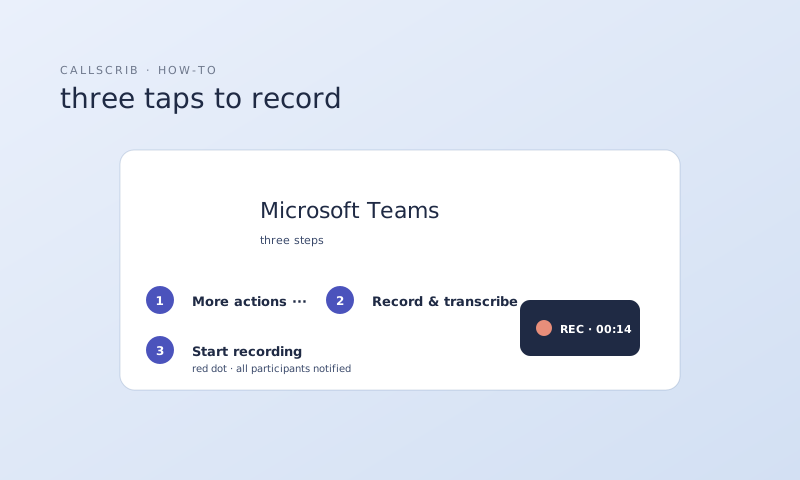
Your Microsoft 365 admin needs to enable transcription in the Teams Admin Center. Here's how: (1) Go to admin.teams.microsoft.com. (2) Navigate to Meetings → Meeting policies. (3) Select your policy (or Global). (4) Set "Transcription" to On. (5) Save. This enables transcription for all users covered by that policy. Users can then start transcription during any meeting by clicking the "Record and transcribe" button.
Can I transcribe phone calls in Microsoft Teams?
Yes, if your organization has Teams Phone (Microsoft Calling Plans or Operator Connect). Your admin needs to enable call transcription separately from meeting transcription. Once enabled, PSTN phone calls get transcripts just like meetings. Note: Direct Routing (third-party SBC) is not currently supported for call transcription.
What do AI tools do with Teams transcripts?
Raw transcripts are long and hard to read. AI meeting tools read the transcript and generate structured output: a title, executive summary, decisions made, action items with owners, and next steps. The best tools deliver this summary directly to your Teams chat so the whole team sees it. CallScrib, for example, posts an Adaptive Card summary to the meeting chat within 60 seconds of the call ending.
Which AI tool should I use for Teams transcription summaries?
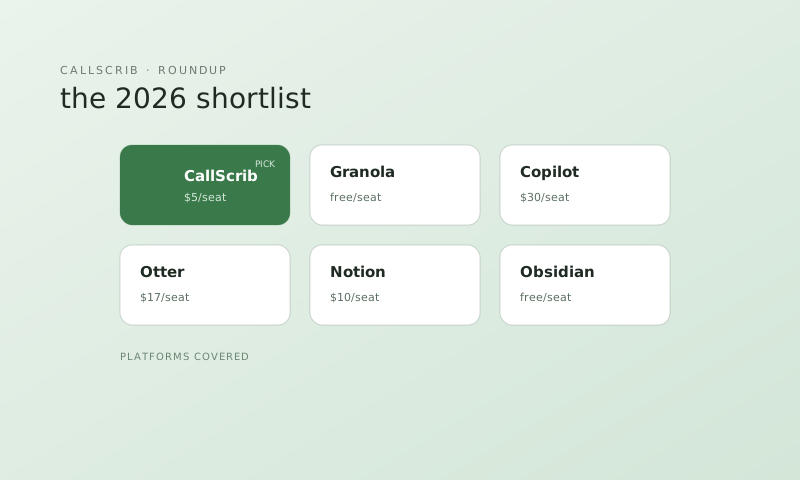
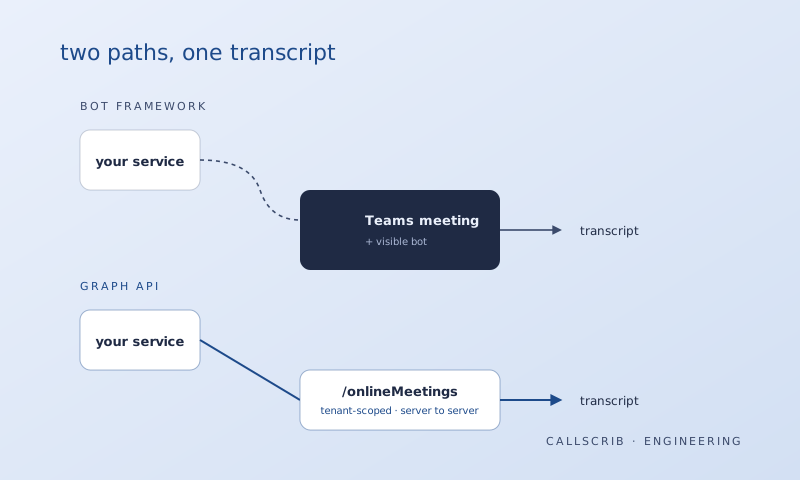
There are two approaches: (1) Bot-based tools like Fireflies.ai, Otter.ai, and Fathom join your meeting as a participant to capture audio. These are being blocked by Microsoft starting mid-2026. (2) Graph API-based tools like CallScrib read the transcript that Teams already generates — no bot joins. This approach is future-proof and invisible to participants. For most Teams organizations, a Graph API-based tool is the better choice in 2026 and beyond. See our 7-tool comparison for the full breakdown.
Do I need Microsoft Copilot for AI meeting summaries?
No. Microsoft Copilot can summarize meetings, but it requires an E3/E5 license plus a $30/month Copilot add-on. Tools like CallScrib provide AI meeting summaries for $5/user/month and work with any M365 Business Standard license. CallScrib also covers phone calls, which Copilot does not.
How to set up automatic meeting summaries in Teams
Step 1: Ask your M365 admin to enable transcription in Teams Admin Center. Step 2: Install CallScrib (5 minutes, one-time admin setup). Step 3: Hold your meetings as normal. CallScrib reads the transcript after the meeting ends and posts a summary to your Teams chat within 60 seconds. No bot joins, no buttons to press. It works for both scheduled meetings and phone calls.
The AI notetaker built for Microsoft Teams. No bot in your meetings. 7 meetings per month free, no credit card.
Frequently Asked Questions
How do I turn on meeting transcription in Microsoft Teams?
Your M365 admin needs to enable it in the Teams Admin Center under Meetings → Meeting policies. Set "Transcription" to On. Users can then start transcription during any meeting.
Is Teams meeting transcription free?
Yes. Meeting transcription is included in Microsoft Teams at no extra cost. You need Microsoft 365 Business Standard or above. AI summary tools like CallScrib are separate services.
Can I get AI summaries without Copilot?
Yes. CallScrib provides AI meeting and call summaries for $5/user/month with 7 free summaries every month. No Copilot or E3/E5 license required.
Does transcription work for phone calls in Teams?
Yes, if your organization has Teams Phone (Microsoft Calling Plans or Operator Connect) and your admin has enabled call transcription. Direct Routing is not supported.